// Case study
Canva Apps SDK Content Publisher intent
Platform design that scales Canva to the publish & distribution ecosystem.
Dec 2024 – Dec 2025
// 01 — problem
Problem
Partners needed a clear, consistent way to publish content into Canva—without each app inventing its own flow or fighting the platform.
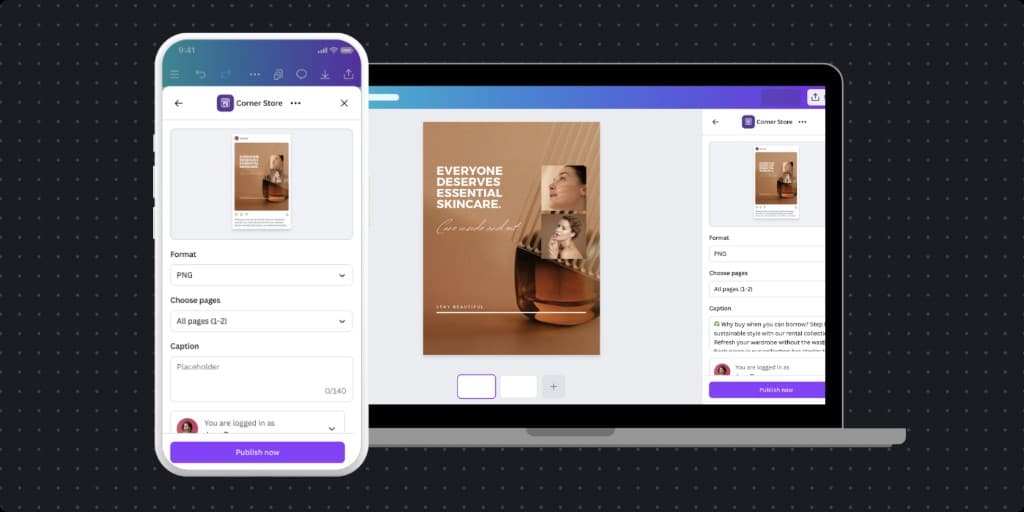
Canva's ambition is to expand from a design tool into the end-to-end enterprise workflow—plan, design, publishing, and insights. The Content Publisher intent API is the platform move that makes "publish and distribute" an integrated part of that workflow: a shared platform pattern to easily publish Canva designs to our partner-built apps.
The platform approach benefits both partners (one integration pattern, consistent UX, across different Canva surfaces) and internal teams (one scalable model instead of one-off implementations). The stakes were platform-level: get the intent design guidelines right, and everyone could move faster; get it wrong, and we'd need to make breaking API changes.
// 02 — solution
Solution
Define the Content Publisher intent and design guidelines so the API and the UX spoke the same language—then support partners to ship for their use cases.
I led the product design for the Content Publisher intent: the contract between Canva and third-party platforms for publishing Canva designs into the platform's format. That meant aligning three things: the intent (what is the publish use case), the design guidelines (how the flow should look and behave), and the developer experience (so partners could implement easily).
API and UX discovery
I worked closely with the publish feature team and partners to understand their domain knowledge. This insight was essential to help shape the API contract with our engineers to define the intent’s scope—what “publish” means in the Canva Editor, what data can be configured and sent, and what the user sees. The goal was to give users control and confidence: “I’m ready to publish this design from Canva.”
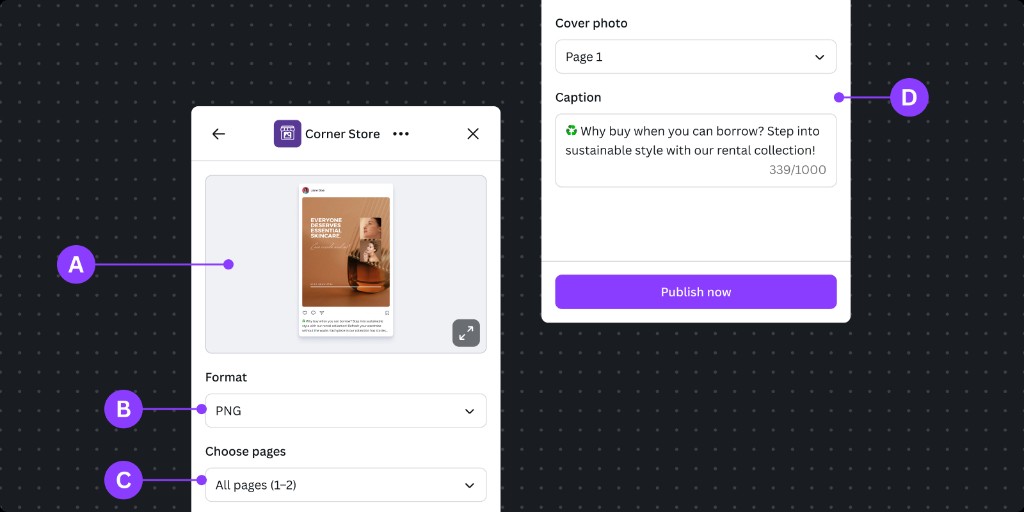
Design guidelines and UX patterns
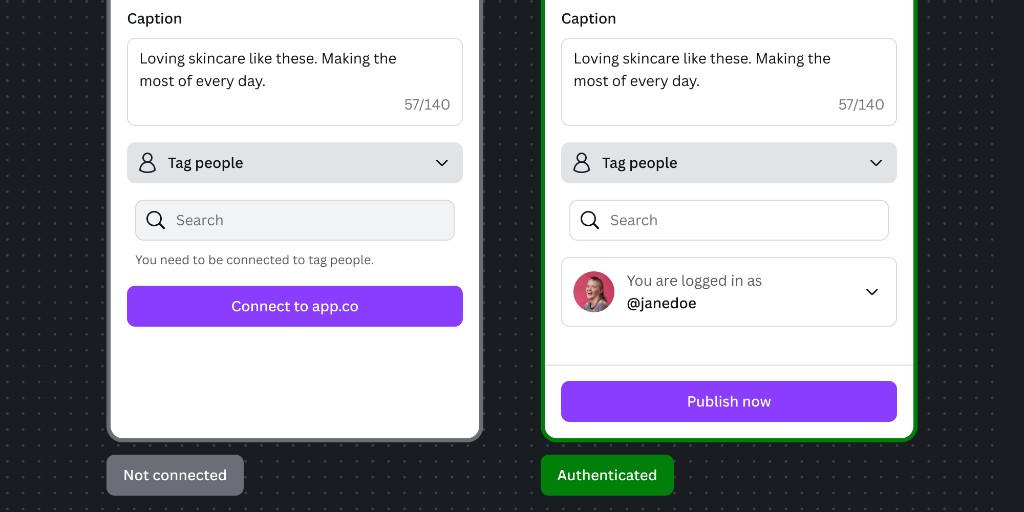
I created the UX patterns and design guidance so every app using the intent would feel like part of the native Canva experience. That included:
- Written guideline on the use case, anatomy, flow structure, authentication, edge case handling, and performance benchmarking, for developers and the dev MCP server
- Created the Figma starter kit
- Upskilling our app review team with the QA checklist
Partner enablement
I worked closely with our beta partners, such as LinkedIn, Mailchimp, SimpleBooklet, Sprout Social, to shape the API and UX together. I gathered their feedback to refine and then aligned on the design, so their implementations matched the API and guidelines, and we could learn from real usage before scaling.
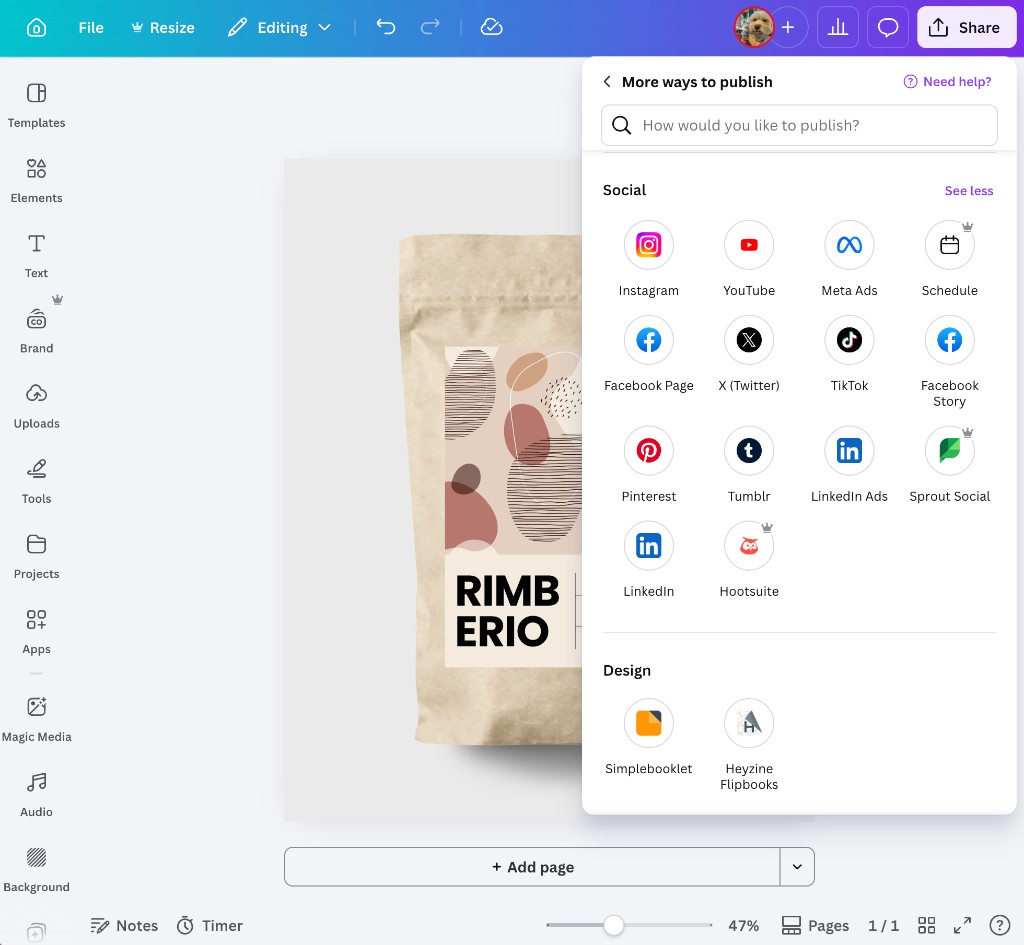
The outcome was a clear design direction to announce the new API with partner apps for the first launch, and how we'll scale the API and UX for future enhancements.
// 03 — results
Results
Seven apps launched; five named partners in market—LinkedIn, Mailchimp, Sprout Social, HootSuite, SimpleBooklet—with a scalable platform pattern.
- 7 apps launched using the Content Publisher intent, proving the pattern worked across different use cases and partners.
- Expanded Canva's capabilities: instead of users manually downloading Canva assets, we streamlined publishing to many new use cases, such as:
- Social media—single platform and aggregators
- E-zine
- Cloud storage
- Enterprise workflows—developers can now build bespoke SDK apps to publish to their private business platforms
- And more use cases to come
- Uplifted partners' engagement: we received positive feedback from partners that the integration has increased user engagement on their platform.
- Platform scalability: The intent and guidelines became the default path for new publish integrations:
- We could deprecate the legacy integration to reduce maintenance cost
- We handed over the API ownership to the feature team, so we as the platform team can focus on building new API capabilities
- The API is open to anyone to build a publish app in the Canva ecosystem
- Foundation for what's next: The intent and guidelines are built to extend to future publish capabilities and deeper integration within Canva, so the platform can expand beyond the initial flow without reworking the API contract.
// 04 — lessons
Lessons
Platform design pays off when you treat the “contract” (intent + guidelines) as a product and invest in a few early partners to validate it.
- Platform approach with intents: The Content Publisher intent wasn’t just a technical hook—it was an architectural paradigm. I learned best practices by researching the intents approach by leaders such as Apple's App Intents and Android Activities. Defining Canva's intent clearly (what it does, what it doesn’t, how it looks) gave developers a single starting point to build, maintain and scale with Canva's ecosystem.
- Design guidelines scale better than one-off designs: Creating the UX guidelines and patterns allowed us to scale beyond direct design support. We could align the design direction with the wider team, and any developer could self-serve to build more publish apps.
- API fluency is an essential design skill: I applied the same mental model in service design for the intent's API. This insight allowed me to connect the dots between the different interfaces and the use cases, so the platform can scale for future publish workflows—for both users and AI agents.
- Early partnerships de-risk the pattern: Working closely with the feature team and partners to shape the UX and API together allowed us to leverage the subject matter expert knowledge, such as their user research, market insight, and industry best practices, and allowed us to design in the right direction.